
Kanban Board
Personal Use of Kanban Board
What is Kanban Board?
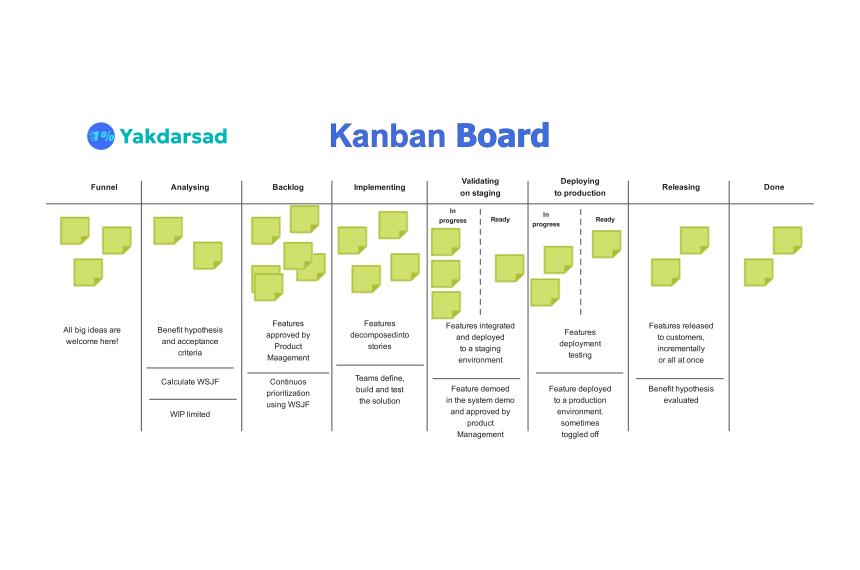
A Kanban board is a visual workflow tool that shows the state and flow of work. At its core it translates abstract task lists into visible cards (sticky notes, widgetes, text box, writing, or any other type) that move across columns representing process steps. The simplest boards have three columns — Backlog, Work in Progress (WIP), and Done — while more advanced boards subdivide stages (e.g., To Do → Ready → In Progress → Review → Done) and add swimlanes for parallel streams and team memebers.
Why it works:
- Visibility: Everyone sees what’s being worked on and where bottlenecks form.
- Pull-based flow: Team members pull work when capacity exists, rather than being pushed tasks.
- Flow focus: The board surfaces delays, enabling continuous improvement.
- WIP limits: Explicit caps on the number of items in a column reduce multitasking and improve throughput.
Real-world example: a small software team uses a Kanban board where each card tracks a feature or bug. When a developer finishes a task in “In Progress,” they move it to “Code Review.” If “Code Review” has a WIP limit of two and both slots are full, no new tasks are started — encouraging the team to finish review work instead of piling up in-progress tasks.
History of Kanban Board?
Kanban originates from manufacturing. In the late 1940s and 1950s, engineers at Toyota developed the approach as part of the Toyota Production System to manage inventory and production flow. The method emphasized signaling, limiting in-process inventory, and matching production to demand using simple visual cues — cards or bins that signaled when more parts were needed.
A key figure in adapting and codifying the method was Taiichi Ohno, who helped shape the principles that reduced waste and improved efficiency. Over decades Kanban moved from factory floors to knowledge work — especially software development and service operations — where the same flow and pull principles help teams manage tasks and reduce lead time.
Context note: The technique evolved as practitioners adapted its visual and flow-centric principles to different domains, but the essential idea — visualize work, limit WIP, and improve flow — remains consistent.
Application of Kanban Boards
Kanban boards are versatile and apply across industries and team sizes. Typical applications include:
Software development & IT operations
- Manage feature work, bug fixes, and incident response.
- Integrate with CI/CD pipelines: cards move automatically when builds/tests pass.
- Use swimlanes for hotfixes vs. planned work.
Marketing & creative teams
- Coordinate campaign tasks: concept → copy → design → approval → publish.
- Track content calendars and approvals, avoiding bottlenecks in review stages.
Product & project management
- Visualize cross-functional work, e.g., design, engineering, QA, legal.
- Prioritize continuously and manage scope with flow metrics.
Support & service desks
- Route tickets across tiers (Tier 1 → Tier 2 → Escalation).
- Apply SLAs by tracking lead times per column.
Personal knowledge work and household projects
- Track learning goals, errands, or home improvements.
- Break big goals into actionable cards and enforce WIP limits to keep momentum.
Key practices when applying Kanban:
- Define explicit policies: what qualifies a card to transition between columns.
- Set WIP limits and treat them as rules, not suggestions.
- Measure flow: lead time, cycle time, and throughput.
- Run periodic cadences: daily stand-ups focused on flow and a retrospective to improve policies.
Personal Use of Kanban Board for our Daily Tasks
A personal Kanban is a compact, powerful way to manage daily tasks, reduce overwhelm, and increase focus. Here’s how to adopt it for individual productivity.
Start simple
Use three columns: Backlog, Doing, Done. Add cards for actionable tasks (not vague goals). Example: “Submit grant draft,” “Gym — 45 min,” “Buy groceries.”
Limit WIP
Set a Doing limit (e.g., 1–3 items). Limiting WIP keeps attention on finishing tasks instead of starting many things and finishing none.
Add context to cards
Include small details: estimated time, due date, next action. This prevents decision paralysis when you return to a task.
Prioritize by energy and time
Group tasks by required focus level. Use tags or colors for “deep work” vs. “shallow tasks.” Schedule deep work cards for your best hours.
Use recurring patterns
Create template cards for routine items (e.g., weekly review, backup, billing). When the time comes, copy the template rather than rewriting.
Example daily flow
- Morning: Move top priority from Backlog → Doing.
- Midday: If Doing items block, move blockers to a “Blocked” column and add a note why.
- End of day: Move completed cards to Done and spend 10 minutes grooming Backlog.
Tools & formats
- Physical: sticky notes on a whiteboard — tactile and fast.
- Digital: Trello, Jira, Azure Boards, Notion — good for remote work and automation.
- Hybrid: Photo of the physical board for remote team visibility.
Benefits for individuals:
- Clear focus and fewer context switches.
- Better estimation of how much you can realistically accomplish.
- A visual history of completed work — useful for momentum and reporting.